Analog Oscillator

This Oscillator type uses analog modelling techniques to replicate the sound of analog synths.
It contains 3 Child Oscillators - A, B and C.
Selecting an Analog Osc

You can have up to 3 Analog oscs in your patch, each with and A, B and C osc. Click the arrow button at the right of the first 3 osc tabs, and select Analog.
Osc A

- Enabled switch
Turns the Osc on or off. - Preview screen
Shows the shape of the current waveform. - Waveform switch
Choose from Saw, SquareSaw, Square, Triangle, Sine - Pulse Width / Push / Tri Center / Stretch
This knob alters the shape of the waveform differently for each waveform type (see below). - Step Saw / Multiply / Fold
This knob increases wavfrom complexity differently for each waveform type (see below).
Saw Controls

- Push
Bends the saw until it reaches a higher octave. Similar to a distortion. - Step Saw
Adds an increasing number of square waves to the edges of the saw.
SquareSaw Controls

- Pulse Width
Decreases the width of the left (square) section of the waveform. - Multiply
Adds an increasing number of square waves to the left (square) section of the waveform.
Square Controls

- Pulse Width
Decreases the width of the left section of the square wave in the classic PWM fashion. - Multiply
Adds an increasing number of square waves to the waveform. Similar but different to a sync sound.
Triangle Controls

- Tri. Center
Moves the center of the Triangle right in a manner similar to PWM. - Fold
Increases the amplitude of the waveform, folding it back down when it reaches the top. Has the effect of adding more triangles to the waveform.
Sine Controls

- Stretch
Bends the peaks of the sine towards the edges, making the waveform similar to a saw wave. - Fold
Increases the amplitude of the waveform, folding it back down when it reaches the top. Has the effect of adding more sine waves to the waveform.
Osc B

Osc B is identical to Osc A, except that the fold / multiply control is replaced by a Phase knob.
- Phase Knob
Controls the starting point of the waveform. Increase the value and look at the small screen to see the current phase.
Pitch Controls
These controls are common for Oscs A, B and C.
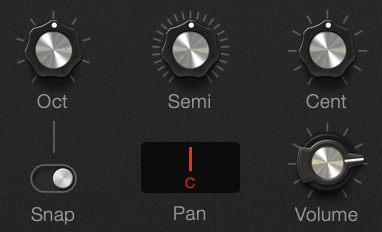
- Oct, Semi, Cent knobs
Control the pitch of the child Oscillator - Octave Snap Button
When enabled, the Oct control will adjust the pitch plus or minus 4 octaves.
When disabled, the control will allow all values within this range. This allows you to automate smooth sweeps of the pitch over large ranges. Perfect for creating kick drums. - Pan
Sets the stereo position. - Volume
Sets the internal level of each child osc. This volume is applied and then the combined signals of the 3 oscs sent to the Analog Osc volume slider in the mixer.
A and B Cross Modulation
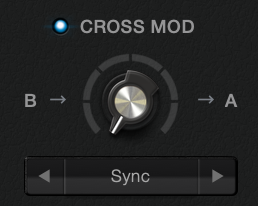
The A and B oscs can be synced and modulate / affect each other. The large screen in the center shows the combined result of the A and B oscs, including any Cross modulation
- Cross mod enabled
When turned on, the shape of the osc A waveform will be affected by osc B in a variety of ways. Both A and B oscs need to be enabled. The volume of the B osc is not used, and so can be set to silent and the B osc will still modulate the A osc - Cross mod mode selector
Chooses the mode for the cross modulation - Cross mod amount knob
Controls the amount of the cross modulation.
A and B cross modulation types
Sync
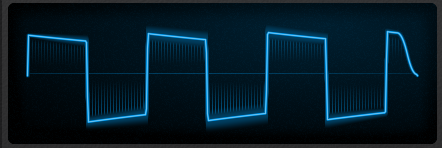
In this mode, whenever the B osc has completed a cycle, the A osc ends abruptly and starts again - it is synced to the B osc. In practice, you will hear differences when the B osc pitch does not match the A osc.
In addition, the amount slider will multiply the pitch used from the B osc. This lets you hear the sync sound without having to change the pitch of the B osc at all.
Sync Log
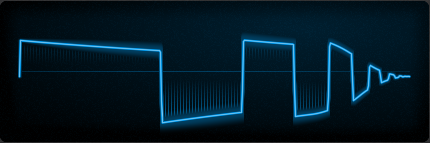
Similar to sync, but the repeated waveforms get higher and higher in pitch. This sync adds a lot of high frequency harmonics to the osc shape.
FM Exponential
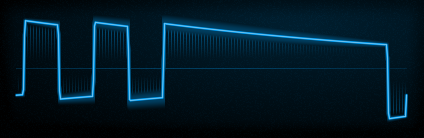
Frequency Modulation. The frequency of the A osc is altered by the waveform of the B osc.
This effect sounds best with the amount knob set to lower values.
FM Linear
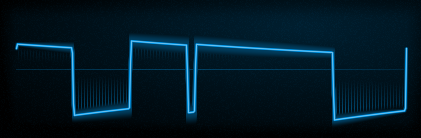
Similar to FM exponential, but the relationship between the 2 oscs is calculated in a way that keeps the result more 'in tune' than the Exp mode
AM
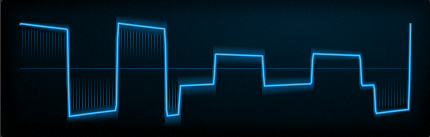
Amplitude modulation. The volume of the A waveform is multipled by the B waveform. This mode sounds best when the B osc is set to a lower pitch or octave than the A osc. Similar to ring mod
Analog C

Analog C is similar to A and B, with the following differences
- Shape
Shape is a variable control rather than a switch. This lets you use waveforms that are halfway between different shapes, and alter the shape during playback. - Pulse Width
Unlike Oscs A and B, all waveform variations have pulse width. - Waveform buttons
The buttons under the screen offer a handy way to reset the shape control to the exact value for the selected shape.
Common Controls

- Key Follow Switch
When turned on, All 3 oscs will follow the pitch of the notes played on your MIDI keyboard. When disabled, the oscs will play at a consistent pitch - Link Pitch Button
When selected, the pitch of Oscs B and C will follow Csc A. You can use this to control all 3 oscs with a single modulation.
The B and C osc pitch controls then become offsets from the A pitch. - Phase Lock Switch
In an analog synth, the oscillators are always running, whether you are holding down the key or not.
When you play a note, the phase or start position of the waveform could be at any position. Imagine a sine wave - instead of starting at zero and the wave increasing, it could start half way through the shape, essentially making the first part of the cycle sound like a square wave.
In ULTRA, you can choose Phase Locked to force the oscs to reset whenever you play a note.
This might be useful if you are playing a bass sound, and want it to sound exactly the same every time you play a note. - Drive Knob
Provides a colourful drive circuit, which affects the sum of the oscs after they have been mixed together.